

*This article applies to all integrated FA Davis products, including Davis Advantage, Medical Language Lab, and the Davis 360 suite.
Using the F.A. Davis External Tool's "Restore" function, you can add previously-deleted FAD assignments back into your LMS Course.
To access the Restore function, navigate to the second screen of the F.A. Davis External tool and select "Restore" for a deleted FAD assignment. You will see a popup confirming whether you want to restore the FAD assignment at-hand.
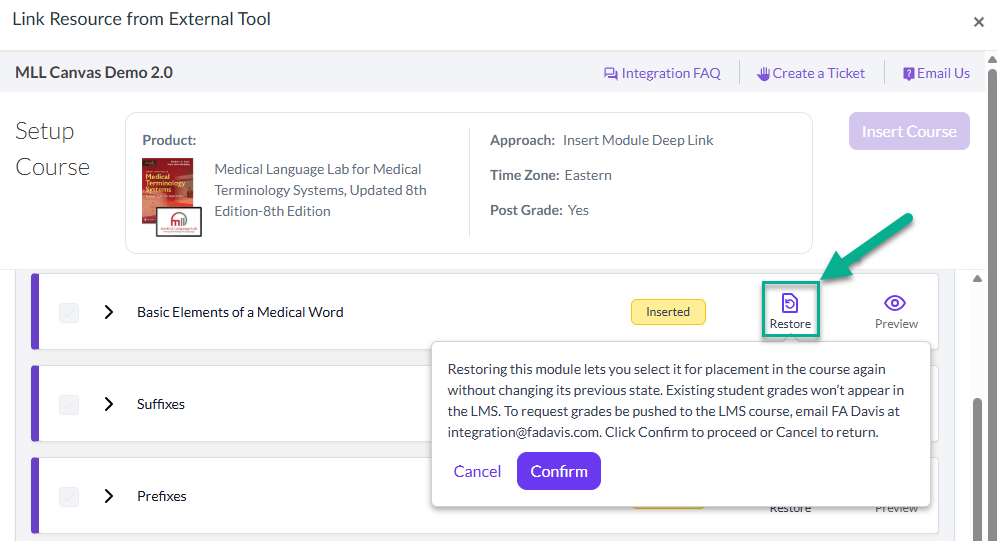
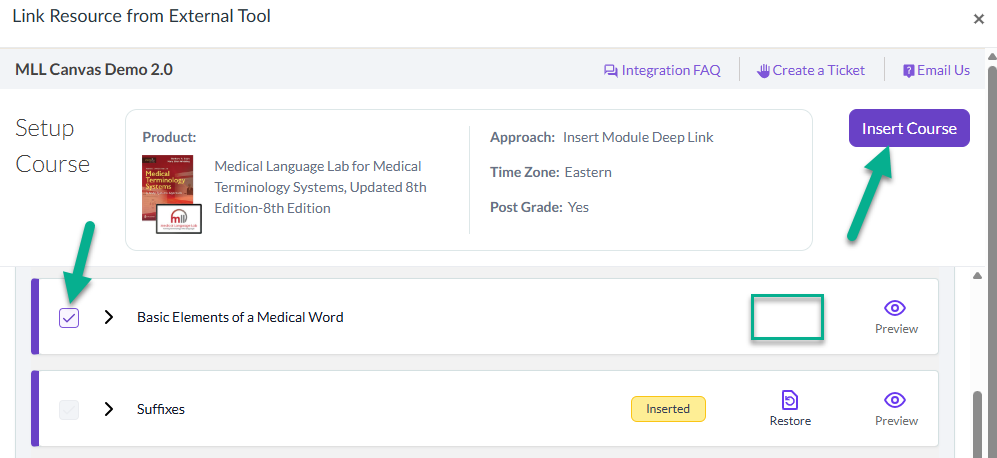
After confirming the restoration of an integrated FAD assignment, its "Restore" option will disappear.
If you'd like to add a restored FAD assignment back into your LMS course, select the checkbox next to your restored FAD assignment, click "Insert Course" at the top of the External Tool, and proceed with the standard procedure of editing then saving an integrated FAD assignment's LMS settings.
Please avoid using the Restore function on integrated FAD assignments that are still accessible in your LMS course, because doing so will create duplicate LMS gradebook entries that likely won't sync with your original assignments' gradebook entries.

