If you want to know where to find your test banks and PowerPoint Presentations, click to jump to the "Instructor Resources" section of this article.
For information on finding ready-made class activities you can add to your lesson plans, click to jump to the "Personalized Teaching Plans (PTPs)" section of this article.
For information on accessing Davis's Drug Guide for Nurses or other FA Davis products you may have access to within your FADavis.com account, click to jump to the "Non-Advantage Resources" section of this article.
Instructor Resources
In addition to Davis Advantage, your textbook comes with Instructor Resources to save you some lesson-planning time!
To access your Instructor Resources, you must log into FADavis.com.
If you're unsure whether you've got an FADavis.com Instructor account, please contact your program's Educational Consultant (EC) or Business Development Manager (BDM) to confirm your account login credentials or to set up your FADavis.com account with access to the necessary textbooks and resources. If you're unsure who your EC or BDM is, ask your program's admin or course coordinator to identify your EC or BDM.

Log into FADavis.com with the same credentials you use to log into your LMS course. If the email address you use to log into your Instructor FADavis.com account differs from the email address you use to login into your LMS course, please contact your EC or BDM to update your FADavis.com account.
If this is your first time logging into FADavis.com, you may have to use the "Forgot Password?" feature to set a password for your account.

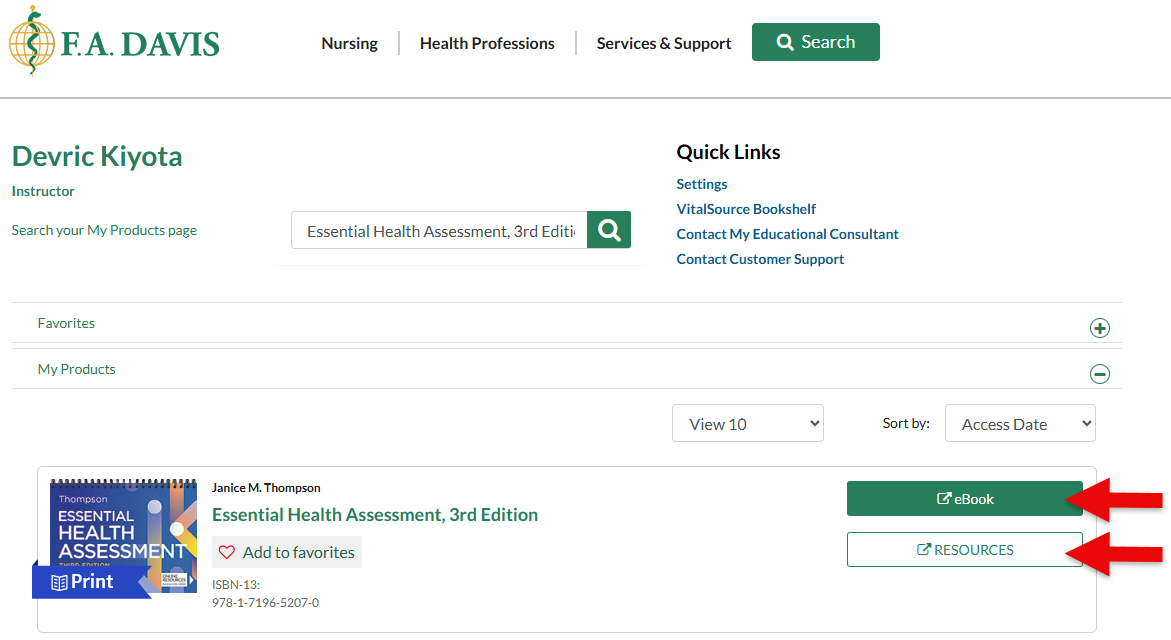
After logging into FADavis.com, you'll see your My Products page, with listings of all the F.A. Davis textbooks and products you have access to.
Find your textbook and click its "Resources" button.

Click the "Instructor" dropdown menu to open your Instructor Resources.
Your students won't be able to access the Instructor Resources that come with your textbook. And, you can edit whatever you find in your Instructor Resources however you see fit!

You can find full PowerPoint Presentations in the "Classroom & Lecture Planning Resources" dropdown menu of your Instructor Resources. These PPTs are ready to use, but you can edit, add, and remove their slides to personalize them further.
Within your "Classroom & Lecture Planning Resources" dropdown menu, you can additionally find an Implementation Guide with insights on using Advantage content in your class, and "Clinical Judgment Debriefing Guidelines" to have ready-made reflection questions to follow doing Clinical Judgment Assignments in-class.

In the "Testing Resource" dropdown menu of your Instructor Resources, click the "Test Banks in Document Format" dropdown menu to find documents with premade test questions for each chapter in your textbook. The questions in your Instructor Resources test banks are separate from the questions students will encounter on Davis Advantage, so you can use your Instructor Resources test banks to create LMS quizzes and assignments.
Check with your admin to confirm whether the test banks seen here have already been added to your LMS course.
The "Next Gen NCLEX Instructor Test Bank" you'll find here has 25 premade questions in the Trend and Bowtie standalone question types, for you to add to your class assignments or activities.

Personalized Teaching Plans (PTPs)
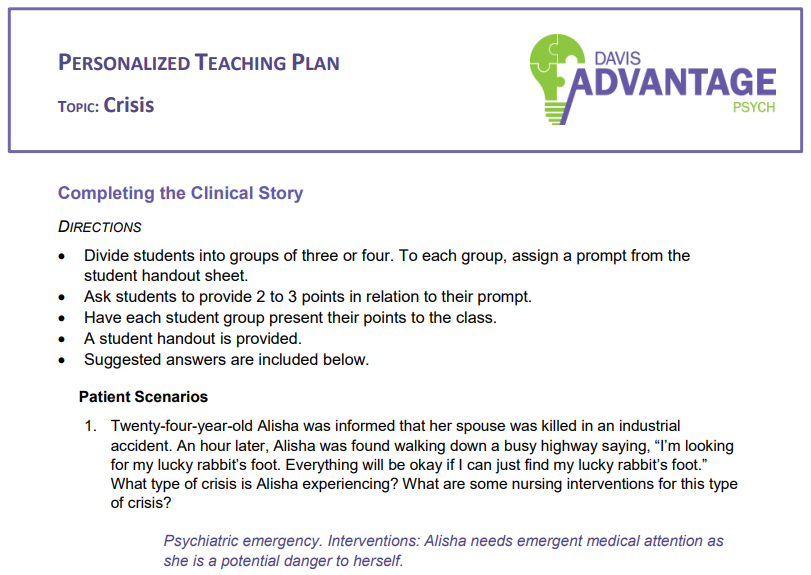
A Personalized Teaching Plan (PTP) is available for each topic in Davis Advantage. PTPs offer a variety of in-class activities, small group work, case studies, and discussions designed to engage students for higher-level learning, and connect students more deeply with the content.
Once you've accessed your Davis Advantage class, click "PTP" in your top-left navigation bar. For more information on accessing your Davis Advantage class, please consult our Instructor "Quick-start Guide" article.

Once on your PTP page, click "Download" to save a word document with three premade in-class activities pertaining to a topic.

Your PTP activities are designed to work in synchronous or asynchronous classes. If one of your PTP activities requires a handout, you'll find it at the bottom of its PTP document for you to separate that handout and print copies.
Non-Advantage Resources
Your FADavis.com account may contain access to additional products that aren't supported by the Davis Advantage platform, like Janice M. Thompson's Essential Health Assessment or Cynthia A. Sanoski's Davis's Drug Guide for Nurses.
To access your Instructor Resources for products that aren't supported by Davis Advantage, you must log into FADavis.com.
If you're unsure whether you've got an FADavis.com Instructor account, please contact your program's Educational Consultant (EC) or Business Development Manager (BDM) to confirm your account login credentials or to set up your FADavis.com account with access to the necessary textbooks and resources. If you're unsure who your EC or BDM is, ask your program's admin or course coordinator to identify your EC or BDM.
Log into FADavis.com with the same credentials you use to log into your LMS course. If the email address you use to log into your Instructor FADavis.com account differs from the email address you use to login into your LMS course, please contact your EC or BDM to update your FADavis.com account.
If this is your first time logging into FADavis.com, you may have to use the "Forgot Password?" feature to set a password for your account.
After logging into FADavis.com, you'll see your My Products page, with listings of all the F.A. Davis textbooks and products you have access to.
Find your textbook and click either its "eBook" or "Resources" button. Though not all products within your FADavis.com account will be supported by the Davis Advantage platform, you'll still be able to view the eBook or access Instructor Resources for every product you have access to.